
🚤 Linh's Wake Surfing Boat
Complete operator guide for wake surfing at Port Royal Marina, Lake Lanier
🏄 Courtesy of Linh — thanks for letting us ride!
Quick Navigation
About this guide: Instructions for accessing and operating Linh's wake surfing boat stored at Port Royal Marina, Lake Lanier. Covers everything from getting it out of storage through full operation, surfing setup, and proper return.
Pro tip: It is better to do wake surfing in the middle of the week with less traffic due to the big waves that are created.
📋
Instructions to Request Access
▼Click any text to edit
- Location: Port Royal Marina
- Contact #: [Get from Linh]
- Confirm which dock location they will put the boat
🛡️
Taking Cover Off
▼Click any text to edit
⚠ Need details here from Linh -- proper procedure for removing covers and where to store them.
- Where to store the covers? [Needs details]
✅
Prep for Departure & Other Guidance
▼Click any text to edit
Make absolutely sure you take the bumpers off the side before heading into the open water!
- NO shoes on the boat. There's a mesh bag under one of the seats where all shoes can be stored.
- Children: Make sure all children of appropriate ages have on life vests, which are located underneath the seats.
- Loose items: Properly store all loose items in the open cargo areas under the seat.
- Life vests: Must be worn by anyone surfing, skiing, kneeboarding, tubing, or in the water.
🏄
Surf Boards & Knee Boards / Rope Setup
▼Click any text to edit
- Surfboards: There are four surfboards stored on the external hanging units. Press the button on the side of the unit to release it and push the clamp to lock it back down.
- Knee board: Stored on the roof.
- Rope: [Location needs details from Linh]
🔑
Starting the Boat
▼Click any text to edit
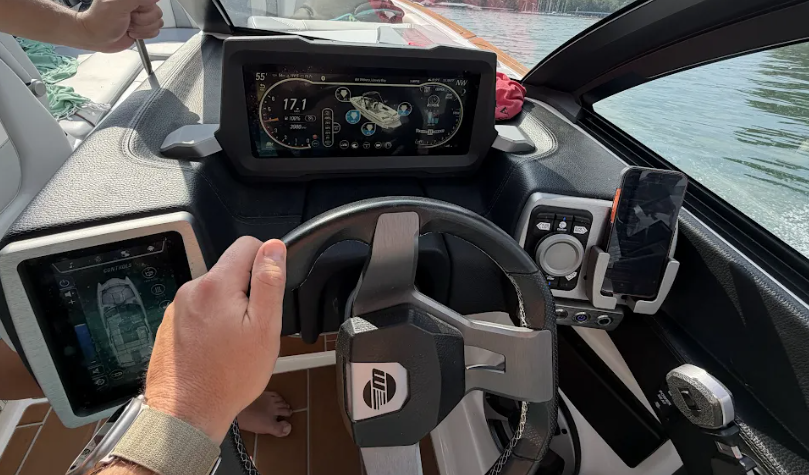
1Turn on battery under the seat across from driver.
2Press power button to the left of the "Start" button.
3Wait for system to launch.
4Turn blower on (button on left screen).
5Let blower run 5 minutes.
6Press Start button.
7Enter code when prompted (get code from Linh).
🚤 Cockpit Reference (see numbered dots below)
1
2
3
4
1
Power Button
2
Blower Button (also the screen to manage Bluetooth connection for music with your phone)
3
Start / Stop Button
4
Code Entry Display — where the request to enter the code will display
🎚️
Throttle Orientation
▼Click any text to edit
- Lift up the small black ring at the top of the throttle to be able to move it forward and in reverse.
- Note the small button on the left side of the throttle for thrusters to orient the boat left and right.
🖥️
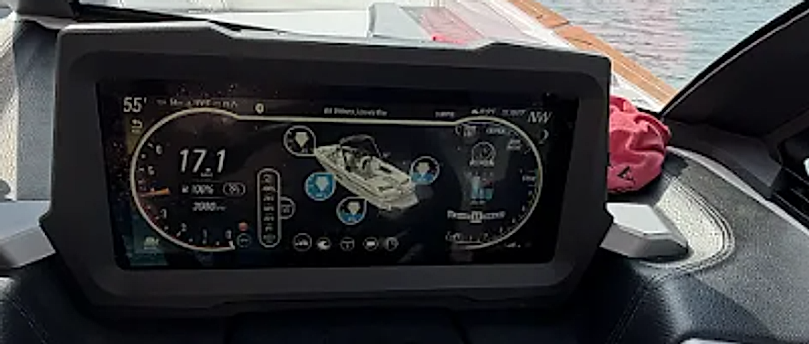
Main Screen Reference (Surf Controls)
▼
🔍 Main Screen Close-Up
A
B
C
D
A
Ballast — Review all the ballast levels here. Shows fill percentage for each tank.
B
Surf Button — Tap to enter surf mode. Choose Surf Left or Surf Right (prefer left). This activates the wave shaping system.
C
Load Button (shows once you push Surf) — After selecting surf direction, hit Load and wait for ballast tanks to autofill. Watch the percentage indicators.
D
Home Button — Tap Home (arrow icon, top left) to drain all ballast when heading back to dock. Always drain before docking.
🌊
Surf Setup (Once in Open Water)
▼Click any text to edit
1Stop the boat once out in open water to prepare for surfing.
2Use the ballast button (little graph icon on far-left side of C1/control screen).
3Hit the Surf/Wave button.
4Choose Surf Left or Surf Right (prefer having them surf on the left side of the boat -- driver's left when facing forward).
5Hit Load and wait until ready -- ballasts will autofill.
⚡
Throttle When Surfing
▼Click any text to edit
1Pull up slowly on the throttle to engage.
2Notify the surfer you are pulling tight and then launching.
3As soon as it's tight, push the throttle down quickly to about 75% to pull up surfer.
4Cruise control / autopilot should pick up and will auto target speed: 10.8 mph.
🚢
Driving & Managing Wakes
▼Click any text to edit
- Surfer stalls: Immediately throttle down gently -- do not jerk everyone off.
- Surfer on left side: Always turn right so you don't turn into the wake.
- Wakes from other boats: Always hit them in parallel, not head-on, to avoid taking on water. The boat is at full ballast and you don't want to add more water for weight.
🏠
Going Home / Draining
▼Click any text to edit
1Hit Home button (top left with arrow on the main screen).
2This drains ballast and gets the boat ready to head home.
Note: The boat will not get on the plane until the ballasts have drained enough. The middle ballast may still show at full load as it can't fully drain while moving unless you let it fully drain before returning.
🔒
Putting Cover On & Final Return Instructions
▼Click any text to edit
⚠ Need details from Linh -- cover replacement procedure and storage company pickup instructions.
- Putting cover on procedure: [Needs details]
- Confirm what part of the dock to leave the boat: [Needs details]
- Instructions to give the storage company for pickup: [Needs details]
- Any other final departure notes: [Needs details]